
The MonoBrick Remote allows you to remote control your NXT. The programs uses The MonoBrick communication library and GTK# which means that it runs on Windows, Linux and Mac OS. Besides USB and Bluetooth connection the remote also lets you connect to the brick over a Wi-Fi or internet connection using the MonoBrick Tunnel or the MonoBrick Tunnel for Android. With MonoBrick Tunnel for Android it is possible to stream video and see what your robot is doing. The remote lets you select between more than 20 different sensors, save sensor values to a file and control motors individually as well as upload and download files, start programs, use the mailbox system and play sound files.
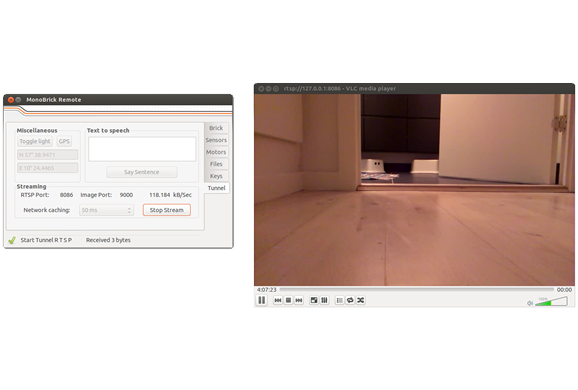
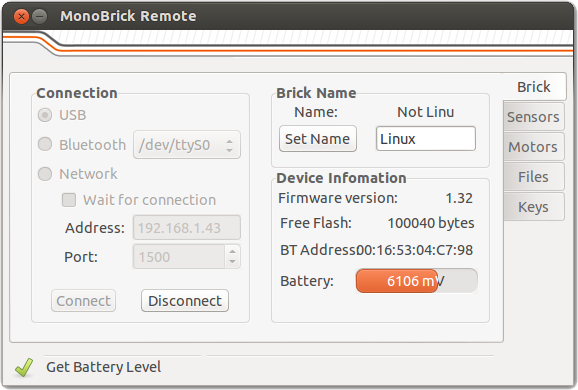
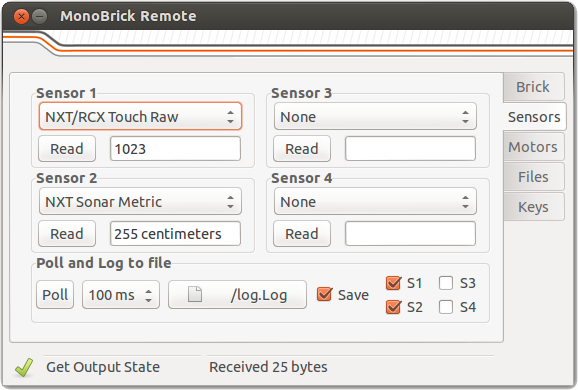
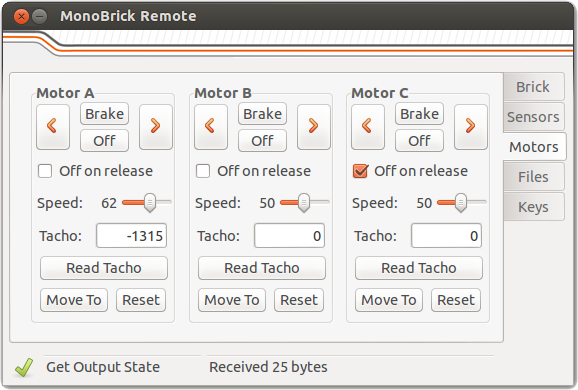
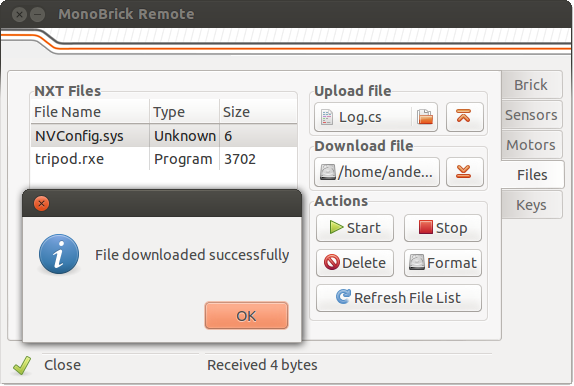
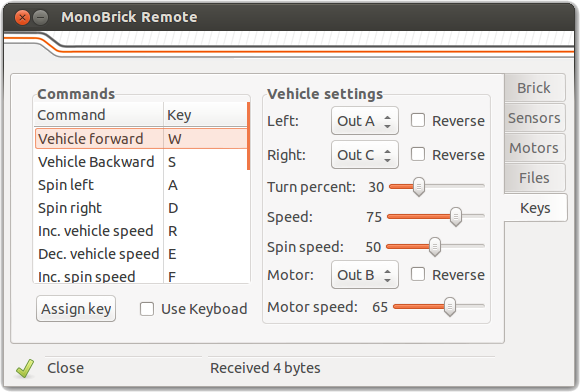
But the coolest part is that the remote let’s you assign keys on the keyboard to read sensor values and control a vehicle that can drive around the house. To control a vehicle simply select the two motors that drives your robot and set the turn ratio to determine how sharp you want your robot to turn.
Running the application
On Windows and Linux the MonoBrick Remote is distributed as a zip file while Mac users have a dedicated DMG installer – use the download link to get the latest version.
- Windows
- Unzip all files from the download to a folder of your choice
- Download and install GTK# for .NET
- Run the exe-file found in the folder where you unzipped the download
- Linux
- Unzip all files from the download to a folder of your choice
- Install Mono Runtime and LibUsb using this this guide
- Use Mono to run the exe-file found in the folder where you unzipped the download
- Mac OS
- Install the Mono Runtime from the Mono website. This guide might be helpfull.
- Install MonoBrick Remote using the Mac OS installer
- Start MonoBrick Remote
-
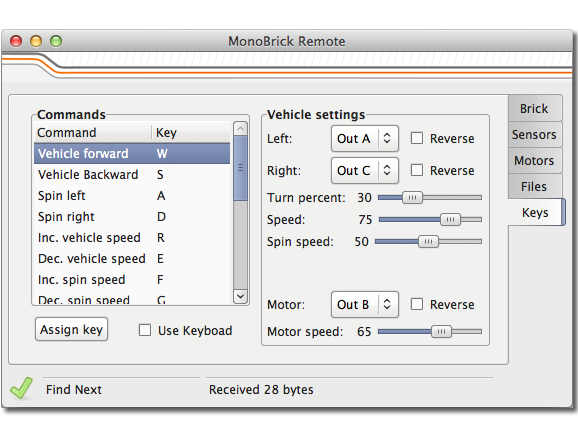
- Mac OS
-
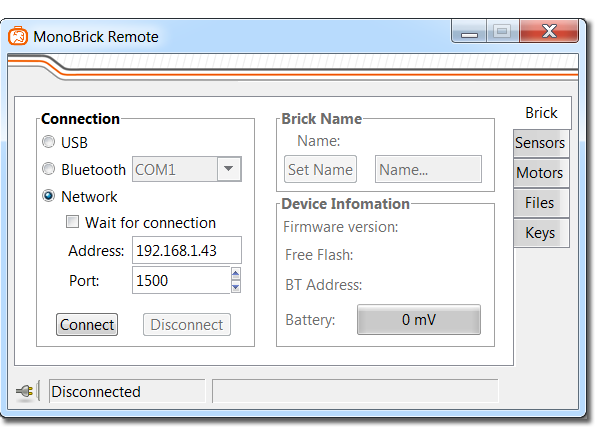
- Windows
-
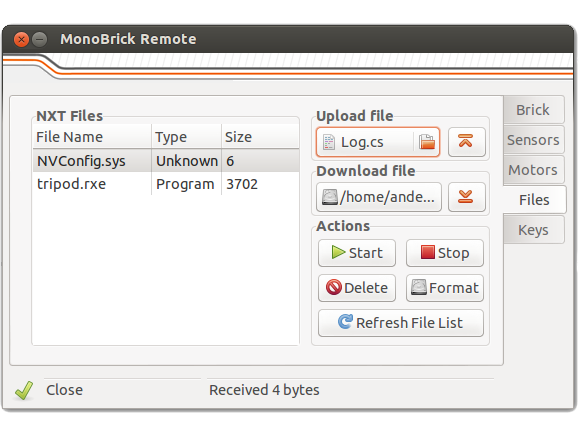
- Linux
Support
Questions related to the MonoBrick Remote can be found in the MonoBrick communication library forum.



Hi. This ist great stuff. I’m using it in the classroom and my students love it. Thank you!
Hi Andreas
Great to hear that. What are you using it for?
Anders
Anders, the mail you sent seems to be empty (not attachments). Would you have a look or try again? Thanks
Awesome remote, thanks. Definitely worth a $5 donation to support your work.
Thanks a lot – I wish there where more like you!
it says pc remote has stopped running
Hi Thanks for visiting my website. Have you installed GTK#. What are your specs?
how do you do that
Use this link http://www.go-mono.com/mono-downloads/download.html
all my specs ar alright but still. also i already did thet but it stillsays that
i already did that but it still doesn’t work. also do i do the stable or latest version
Hi, fow who have problems, first, you need to download GTK# for .NET, don’t download the latest version (i think it may work, but idk) next, if an error happens when opening the .exe file, run it as administrator, it works for me
It doesnt work for me :/ I have win7 64bit installed. Can’t run the .exe. It sais MonoBrick Remote has stopped working. And yes, I have installed GTK#. Thx for help
Which version of GTK# did you install
Sorry, had the latest version and now with the stable one it works fine. Thank you for the great program 😀
Great – glad that I could help
My students and I cannot get this software to work on Windows although the old NXT vehicle remote worked just fine. Can you please put the old version back up somewhere?
Thanks.
Have a great day.
Hi
Thanks for trying the MonoBrick Remote. I don’t support the NXT Vehicle and uploading it to my website is not possible since the source code is lost… so let’s try and solve the problem you are having. What version of GTK# did you download?
Hello Anders,
I tried both 3.2.3 and 2.10.X and we have Windows 7. It did not work.
We installed GTK# either version, unzip the files to a folder, run the executable as an administrator and nothing happens. It just sits there and never opens up. This is the same problem for me as well as all of my students who have tried it. It would be great if you could offer some recommendations to help. Also, if you know of any other software that the students can use as a Bluetooth remote to set the keyboard keys to control the motors and read sensors that would be great.
Thanks.
Have a great day.
Hi Anders,
Never mind we got a different version of GTK# to work and we also found the old nxt-remote.zip file so we are good on both ends. Have a wonderful day!
Great to hear that – what version of GTK# did you use?
If it’s okay with Anders, would you mind sharing the original nxt-remote.zip for us NXT users? Thank you in advance.
Hi Darren
The MonoBrick remote only works with the NXT. It does the same thing as the old remote plus a lot of other things. I have “lost” the source code so…
Anders
Thanks for the reply Anders, but my post was really directed towards CABERRY, who had posted “we also found the old nxt-remote.zip file so we are good on both ends”. I was hoping that CABERRY would be willing to share the nxt-remote.zip file that they’d found. I’m still using NXT and would greatly appreciate it if someone (CABERRY or anyone else that might still have a copy of it) could make that available. Thanks again.
Run as admin
Great Work Anders….it took me a few minutes to geti this amazing app to work. The only thing i cant accomplish is the video streaming.
I got the right ports settings on my Phone (SG3) VLC installed…the latest versión…but when i start the streaming, VLC opens and after a few second it says : “Failed to receive image data”….i got the windows firewall off…but nothing happened.
Whay am i doing wrong??
Thanks in advance
Video data is streamed over UDP so make sure that your router allows you to forward UPD data from your phone to your PC. My guess is that your PC is somehow blocking UDP data on whatever port that you select for the image stream. If the router seems to be correctly set up try to use Wireshark to check if you receive UDP data at all.
Alternatively you could also try the following…
1. Make your phone act as a wireless network to eliminate the router between the PC and the Phone. Make sure that the wireless network that you are creating on your phone has no password.
2. If 1 fails try to make the phone connect to a client (PC). See the “Running the tunnel over a 3G network” section on http://www.monobrick.dk/software/android-tunnel/ for instructions on how to do this.
I hope that this gives you something to work with. Let me know how it goes..
Anders
Hello Anders,
We are using Gtk# for .NET (New version compatible with Xamarin Studio) and this worked for us although we have Windows 7.
If you would like to see how we use the NXT and vehicle remote in my class, please see the following link.
http://www.youtube.com/watch?v=kk78qniGcVo
Darrin I will send a link in a moment to the old NXT vehicle remote.
Thanks for your time.
Have a great day.
Hello Darrin,
Here are two links to the NXT-Vehicle remote.zip.
http://goo.gl/JnEaXD
http://goo.gl/nfCekf
Thanks.
Have a great day.
Have a great day.
Thank you very much for this, CABERRY … very much appreciated! Loved your Bowl-a-Rama video. Looks like your students really enjoy what you’re teaching.
it seems to be a good work man!
but it does not work on my dell laptop
the application does not start when i click on it
i have already installed ‘GTK# for .NET’
What version of GTK# did you install?
I just updated the download link so it points to a specific version of GTK#. I just used this version on a completely fresh Windows 7 64 bit installation.
thank you
i installed it but still the app wont start.
i am talking about the ‘MonoBrick Remote1.4’ thing.
mine finally work’s
I can’t seem to be able to find the EXE for windows. the tutorial wasn’t specific enough.
Did you use the download link and unzip the file?
does this work for ev3 as well?
It is on my to do list – but it does not support EV3 yet.
Awesome, can’t wait!!!
Hey,
The laptop connects without a problem and my phone does too, but when i wan’t to video stream it launches VLC but after 5 seconds it says no image recieved. I tried doing it on a wifi spot from my phone but it still didn’t worked. We also tried to use wireshark but we couldn’t see any UDP data but were not completely sure. Can you help us please? it would be awsome if will work.
Please post questions in http://www.monobrick.dk/forums/user/monobrick-communication-library/
Hello,
I have linux pc so I did that 3 steps but in 3. step my computer doesn’t do anythink so I tried to open thar .exe file with monodevelop, but there is a C# programming language and I don’t want it, I want it like it is on the picture.
And have I download that GTK for linux to let it work?
Thank you.
Ask your question in the forum
Anders
Hello,
Can it stil work with nxt 2.0
Please post questions in the forum
When I downloaded your GTK, my Norton antivirus classified it as safe but when I ran your Monobrick Remote and Tunnel, Norton alerted it as suspicious and they claimed it to be a Trojan virus file. The applications won’t work, even though I run as an administrator. When I turn it on, it will show a command prompt showing the word error. Is there anything wrong?
Hi
Please post questions in the forum. Also try to give precise details of what you did and what is failing…
Anders
I used 7-Zip to unzip my files. It shows: ‘failed to read settings. Using default settings.’ and then a ‘log’ (a txt. file) appears in the folder.
I also use the latest version of GTK downloaded from the Mono website, not from the Monobrick website.
Hi
Please post questions in the forum!
Great software love it 🙂
WHEN I TRY TO OPEN GTK# IT SAYS “THIS SETUP REQUIRES THE .NET FRAMEWORKS 4.0” WHAT DOES IT MEAN?!!
PLEASE HELP!
Hi
It means that you need to download and install the .NET framework here
It won’t let me run on windows 8. Might be administration, but it does download all three files.
Please ask questions in the forum
I got it finally to work on a Windows XP laptop. This is a great programme! Thanks a lot for writing this.
Me funciono muy bien para Windows 7, primero hice una carpeta en el escritorio, descargue GTK# for .NET e instale, después descargue MonoBrick Remote y guarde en la carpeta antes creada, inicie la conexión vía Bluetooth de mi PC al NXT y el puerto por el cual se conecto, después ejecute MonoBrick y seleccione el puerto y listo, el programa es intuitivo y funciona muy bien, gracias.
Try in english…
I feel like a noob leaving a stupid question, but how do I launch the remote? I download the file, which was a Windows Installer Package, and installed it. There is a folder in Program Files (x86) called GtkSharp, but I cant find any launcher. Can someone please tell me how to launch MonoBrick Remote?
Never Mind I figured it out.. sorry
When I click Start Stream in the tunnel, it gives me an error message:
Failed to start VLC
VLC executable path is currently set to:
C:\Program Files (x86)\VideoLAN\VLC\vlc
Do you want to change this
What do I do to fix this?
Wish i could donate but i am a kid!!!
Do you have a IOS version for the camera?
No – sorry
/Anders
Remote doesn’t work on mac os (10.9.5) Says this program might be damaged or incomplete… ?? I’ve installed mono runtime as described.
Please help!
Hi there
Please ask questions in the forum
/Anders
[ERROR] FATAL UNHANDLED EXCEPTION: System.TypeInitializationException: An exception was thrown by the type initializer for Gtk.Widget —> System.DllNotFoundException: gtksharpglue-2
at (wrapper managed-to-native) Gtk.Widget:gtksharp_gtk_widget_get_requisition_offset ()
at Gtk.Widget..cctor () [0x00000] in :0
— End of inner exception stack trace —
at Gtk.Misc..ctor (IntPtr raw) [0x00000] in :0
at Gtk.Image..ctor (System.String stock_id, IconSize size) [0x00000] in :0
at MainWindow..ctor () [0x00000] in :0
at PCRemote.MainClass.Main2 (System.String[] args) [0x00000] in :0
at PCRemote.MainClass.Main (System.String[] args) [0x00000] in :0
Please ask questions in the forum
I was exited to see this website when I saw it so I did everything download GTK file and the remote I extract all the files then click on the program and it just does nothing plzzz help me I really want to use this it looks fun
Any EV3 support yet?
No – but the communication library supports EV3 – so you could make a simple console application that does the same…
/Anders
is there a way to do this for ev3?
like did anybody make a website download yet?